Home-Assistant

Solving my Dreame L50 Ultra's hairball problem with a 3D-printed adapter, wet/dry vac, and Home Assistant

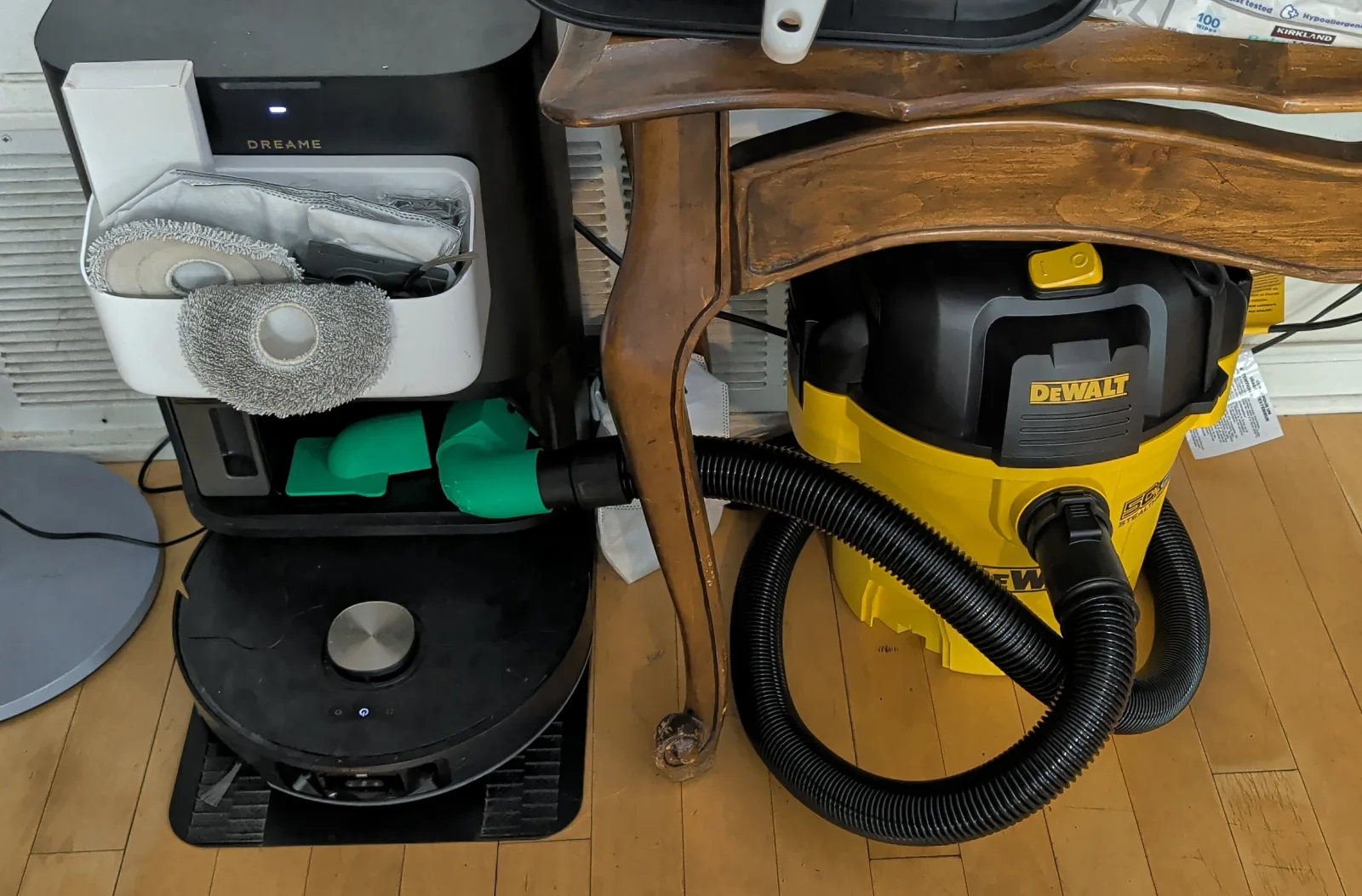
Dreame L50 Ultra dock and robot on the left, with a green printed adapter connected by a loop of black hose to the yellow DeWalt wet/dry vacuum under a table on the right.

The full setup: the Dreame dock on the left, connected to the DeWalt under the table on the right. The wheels are off to make it fit; the hose is still longer than it needs to be.

My Dreame L50 Ultra could pick up dog hair, but its dock struggled to get the dense wads of hair out of the robot and into the bag. I made an adapter so an external wet/dry vacuum could do the emptying instead, with Home Assistant handling the switching. The project is finished and in use, and I haven’t had a hairball since!

I directed the project, took measurements, and printed and fit-tested the parts. Codex did the CAD implementation and Home Assistant automation work, and helped draft this post.

The replacement bags annoyed me too. I was replacing them almost every week. Three hairy doggies shed a lot! Bags like these on Amazon were about fifty cents to a dollar each. Getting them cheaper on AliExpress is an option, but it still sucks when a hairball gets stuck and the bag is only half full. Throwing away a half-full disposable bag means more waste going to landfill, on top of paying for capacity I wasn’t getting to use. Cheaper bags wouldn’t fix the dock’s inability to get the hair into them.

[... 1,084 words]

12:00 am / Dreame , 3d printing , Home assistant , Build123d , Codex , Ai assisted

Fixing the Home Assistant integration for my Dreame L50 Ultra

I wanted my Dreame L50 Ultra in Home Assistant, with its settings and room controls available for my own automations. That led to a small maintenance fork, an investigation into what the phone app sends, and a surprisingly consequential missing @property decorator.

I directed the work, with Codex doing the investigation, code changes and regression tests. It also helped draft this post. My role was setting the goals and providing the context from my vacuum and Home Assistant setup. The work described here was done in September.

The starting point was Tasshack’s Dreame integration. It already does the substantial work: connecting to the vacuum, exposing its settings, handling maps, and providing room-cleaning controls. My fork builds on its development branch, starting at v2.0.0b25, and maintains the changes on main.

Cleaning up after failed setup

A failed setup attempt can still have created connections, background workers, listeners, and timers. Home Assistant may try again, so those resources need to be cleaned up before another attempt adds more.

BigKelLearns’ cleanup pull request and the associated upstream issue were useful starting points. The upstream snapshot already cleaned up ordinary update failures. Authentication failures and cancellation needed more attention.

Cancellation was the tricky part. Cancelling an asynchronous task doesn’t stop work it has already started in a thread. Disconnect immediately, and that thread can still be creating the very resources you’re trying to close.

Codex changed the cleanup to wait for that work before disconnecting. Failed setup and normal unload now use a shared shutdown routine, and pending callbacks are stopped from scheduling more updates afterward. Cleanup errors are logged without hiding the original setup error.

The regression suite includes a hundred failed setup attempts using real worker threads and timers with mocked network responses. It checks that workers stop, sessions close, and the old objects can be collected. Selected tests also failed against the unpatched code in the ways the investigation predicted. That gave us something more concrete than a tidier-looking cleanup function.

Checking what my L50 actually supports

“L50 Ultra” is the name on the box, but the integration deals with internal model identifiers and firmware capabilities. In the September investigation, account metadata identified mine as dreame.vacuum.r9493h, running firmware build 6000.

Codex compared the integration’s settings with the configuration and protocol mappings in that model’s Dreamehome app plugin. That covered things like wash-water temperature, silent drying, hair compression and obstacle crossing. Most of the settings checked were already supported. The shared plugin serves other models too, so a feature name appearing somewhere in its code wasn’t enough to say my vacuum supported it.

There was a general metadata bug to fix as well: a device’s key index was checked against the capability table instead of the separate key table it actually indexed. Codex corrected the bounds check and added regression cases.

The missing decorator

The room-order investigation found a particularly small bug. The integration supports an older room-order format and a newer one, with existing logic to choose between them. But cleaning_sequence_v2 was missing its @property decorator.

The caller expected a boolean. Instead, it got a bound method, which evaluates as true. That forced the newer format even when the selection logic should have chosen the older one.

Adding the decorator restored that logic. Tests cover the modern L50 path and the older fallbacks. This was a reproduced code defect found during the audit; I hadn’t observed it failing on the physical vacuum.

A small maintenance fork

The result is a fork with a few specific defects fixed, building on the much larger integration Tasshack and its contributors made possible. The validation notes and L50 audit record the checks and the remaining hardware work.

The lifecycle tests use mocked network responses, and the app comparison didn’t send cleaning commands or change device properties. Longer-term reconnect behavior and resource use during real cloud outages still need checking. The fixes have regression coverage; that isn’t the same as proving every model, firmware version and failure path on hardware.

I’m glad we could turn this investigation into fixes other people can inspect and reuse. If you’re working through similar setup failures or model-support questions, the fork and audit notes should give you somewhere to start.
12:00 am / Home assistant , Dreame , Debugging , Codex , Ai assisted

Guard Dog and Sentry: watching doggies with Reolink on Android TV and Mac

The house I’m in has an extensive Reolink camera system, inside and outside. We’re keeping an eye on three doggies as they move between those spaces. Reolink’s desktop app didn’t automatically switch to the cameras with activity, and I found it a bit crashy in my use. I wanted the views to follow wherever the dogs were hanging out without having to keep switching cameras myself.

So I built two sister apps with the assistance of Codex:

  • Guard Dog, a Kotlin app for the living-room Android TV, gives everyone in the room a view of what’s happening.
  • Sentry, a native Swift app for my Mac, lets me watch the doggies while I’m working, including in Picture in Picture.

I supplied the goals and directed the work; Codex did the investigation and implementation described here. Codex also drafted this post.

Choosing the views

Both apps use local Home Assistant activity events to choose which cameras to show, with a direct event connection for one standalone camera. Video goes straight from the cameras or NVR to the viewing app. Home Assistant supplies the activity information without carrying the video.

Up to four cameras appear at once. Already-visible cameras keep their positions when another view arrives, and a cleared detection gets twenty seconds of grace. When everything goes quiet, the last active camera stays on screen. A dog briefly falling out of the camera’s detection zone shouldn’t make the whole layout collapse and reform.

[... 859 words]

12:00 am / Android , Macos , Swift , Reolink , Home assistant , Video , Codex , Ai assisted

My security camera tells me when the laundry is done

I wish Reolink did more with the speakers in its cameras. They’re already powered, on the network, and sitting in useful places. They could double as little smart speakers for announcements, but that use doesn’t seem to get much attention.

I got these camera announcements working with the assistance of Codex. I supplied the ideas and directed the work; Codex did the technical investigation and implementation for my integration fixes and automations. The existing integrations are credited below. Codex also drafted this post.

I’d already opened an issue about adding speaker playback to the library behind Home Assistant’s official Reolink integration. I decided to have Codex investigate getting it working for my setup.

I wanted to know when the washer or dryer finished, even from across the house with the laundry-room door closed. There was already a Reolink camera with a speaker next to the stairs, near the bedrooms and a bit away from the machines. That seemed like a useful place for the announcements to come from.

First I needed Home Assistant to know when the appliances finished. Samsung had announced a $4.99/month plan for SmartThings API access, with free access being phased out starting in October. I wasn’t about to pay a stupid subscription for that. I used LocalThings instead: a free, open source integration that talks to the washer and dryer directly over the local network.

I still had to connect the appliances to SmartThings first to get LAN access working, and keep them registered there. LocalThings handles Home Assistant’s ongoing communication with them locally.

The official Reolink integration still lists two-way audio and text-to-speech as unavailable, so I used a custom integration.

I started with ha-reolink-talk, Matthew Holm’s integration based on joeblack2k’s Reolink Talk. It already provides camera media players for audio files and text-to-speech, including cameras behind an NVR. I had Codex investigate and fix a couple of problems with my setup in a fork.

The first was camera discovery. Codex found that a separate request to the NVR failed because of its self-signed HTTPS certificate. The error was caught, and discovery quietly fell back to channel 0. I’m still wondering how the hell this worked in the upstream author’s setup without hitting that certificate error. Meanwhile, Home Assistant’s official Reolink integration was already connected and knew which channels existed. Codex changed discovery to reuse that information, which got the right cameras to show up.

The audio framing needed fixing too. The encoded audio blocks weren’t being packaged the way the camera expected. Codex corrected the block metadata, padding, and stream framing, which got speech playing through the camera. Those fixes are in my fork and an upstream pull request.

Once playback worked, I had Codex implement the laundry automations. Each appliance’s LocalThings progress sensor reaching finish triggers an announcement through the camera by the stairs. Piper supplies the speech: “The washer has finished its cycle,” or the dryer equivalent.

I had Codex put together a few versions of the sound for me to try, including repeated flute announcements and a Samsung completion melody. With the appliance and the camera playing the Samsung melody out of sync, it was a confusing cacophony. I went with one short tone followed by speech instead. The washer gets a higher tone and the dryer a lower one. Codex rendered each tone and its spoken message together into one audio file, so the camera only has to start playback once.

The laundry automations are specific to this house, but the integration fixes are there for other Reolink owners to use. A camera speaker is a pretty convenient little announcement speaker when it’s already in the right place.

12:00 am / Home assistant , Reolink , Automation , Ai assisted , Codex