Codex

Moving Gmail Send mail as to Cloudflare SMTP

I just finished moving my Gmail “Send mail as” setup to Cloudflare Email Service’s native SMTP submission. I can send email from my mindflakes.com address.

I built the SMTP relay described here with the assistance of Codex. I supplied the idea and directed the work; Codex did the technical investigation and implementation. Codex also drafted this post.

Update, October 12, 2026: Google is removing Gmail’s “Send as” support for third-party addresses in January 2027. Google’s announcement says existing setups continue during the transition, but new configurations may be restricted. Gmail-to-Gmail aliases and Google Workspace “Send as” are exempt. Incoming forwarding is unaffected. The sending setup described here now has an end date. Darn, I was looking forward to this for years. The rest of this post describes what worked in June.

Back in April, I had built a small Rust SMTP-to-Cloudflare REST API relay. Today I noticed Cloudflare had shipped native SMTP submission.

Part of the appeal here is minimizing vendors. Cloudflare already hosts the domain, handles incoming mail through Email Routing, and now can handle outgoing mail through Email Service too. For a personal domain, that can be cheap or free, and it is a nice alternative to paying for Google Workspace when a personal Gmail account is otherwise fine.

[... 722 words]

2:13 pm / Rust , SMTP , Cloudflare , Gmail , Email , Ai assisted , Codex

Plainize Clip

I made Plainize Clip, a tiny macOS app that cleans the current clipboard and quits.

I built Plainize Clip with the assistance of Codex. I supplied the idea and directed the work; Codex did the reverse engineering and implementation. Codex also drafted this post.

The short version is that I still wanted the old Plain Clip shape: copy weird text, launch the app, paste something boring.

Not a clipboard manager. Not a menu bar app. Not a background process sitting around in RAM forever. I launch it through Spotlight, it rewrites the pasteboard as plain text, and then it exits.

The annoying clipboard problem

Copying text on macOS is often not just copying text.

Sometimes it brings formatting. Sometimes it brings weird invisible characters. Sometimes it brings smart quotes, hard-wrapped lines, non-breaking spaces, tabs, and whatever else got dragged along from a PDF, web page, chat app, or ticketing system.

Usually I do not want a whole clipboard workflow. I just want the pasteboard to stop being annoying.

So Plainize Clip does the small version:

  1. Read the general pasteboard.
  2. If there is text, clean it.
  3. Write back plain text only.
  4. Quit.

That is the whole normal launch path.

Launch, clean, quit

The important behavior is that Plainize Clip is faceless.

[... 657 words]

11:05 pm / Macos , Swift , Clipboard , Appkit , Reverse engineering , Codex , Ai assisted

Blocking spammy caller names with VoIP.ms Call Hunting

I made a small Rust VoIP.ms CNAME blocker.

I built this caller-name blocker with the assistance of Codex, using GPT-5.4 with medium reasoning effort. I supplied the idea and directed the work; Codex did essentially all of the technical investigation and coding. AI also drafted this post.

The short version is that I wanted to block a caller by name instead of by phone number.

This sounds like it should be an option in VoIP.ms. For all the features VoIP.ms has, this is not one of them. So I made one for cheap.

The missing filter

VoIP.ms has a pretty capable CallerID Filtering feature. You can filter on specific caller ID numbers, phone book groups, anonymous callers, calls that do not match the North American number format, STIR/SHAKEN attestation level, and wildcard patterns like area-code-ish blocks.

That is all useful, but these asshole spam callers and scammers do not politely stick to one number. They rotate numbers. Blocking one just means the next call comes from another one. What I wanted to block on was the caller ID name.

VoIP.ms has CNAM support too, but as far as I can tell it is for displaying names, not filtering on them. Their blog post on stopping spam calls talks about filtering numbers, area codes, and anonymous callers, while describing CNAM as a way to identify callers before picking up. The Caller ID wiki page describes incoming Caller ID name lookup as an optional per-DID setting that can display a caller name for US and Canadian callers.

[... 709 words]

7:30 pm / Voip , Sip , Rust , Voip ms , Telephony , Ai assisted , Codex

Unofficial MakerWorld PMM OpenSCAD Reference

I made an unofficial MakerWorld PMM OpenSCAD reference.

I put this reference together with the assistance of Codex. I supplied the idea and directed the work; Codex did the research, coding, and documentation, including collecting the PMM rules and building the font index. Codex also drafted this post.

The short version is that I wanted Codex to help me make MakerWorld-customizable OpenSCAD models, and I did not want it guessing from old forum posts, UI behavior, and whatever I happened to remember at 1 AM.

This started because I wanted to use agents on my own OpenSCAD projects without re-teaching the same MakerWorld-specific weirdness every time.

The documentation problem

MakerWorld’s Parametric Model Maker is genuinely useful. OpenSCAD plus a web customizer is a great fit for 3D-printable stuff where the interesting part is “same idea, slightly different dimensions.”

If you have not run into it before, OpenSCAD is CAD by writing code. You write variables, modules, and geometry operations, and it turns that into a model. That makes it very good for customizable prints, and very annoying when a target platform has extra rules.

Unfortunately, the OpenSCAD side of PMM is documented in a very internet way. Some of it is in release posts. Some of it is in support replies. Some of it is in the actual web app. Some of it is people trying things and reporting what happened.

There is a Bambu forum thread literally titled Any Documentation on Parametric Model Maker?. The first post asks where to find the requirements for making customizable models. That felt familiar.

For a human, scattered docs are annoying. For a coding agent, they are a great way to get plausible garbage. It might write OpenSCAD that looks fine locally but misses MakerWorld’s actual rules. It might invent a PMM feature because it saw something sort of similar somewhere else.

I do not want an agent inventing // preview[...] as a PMM feature. I want it to know that // color is a thing, // font is a thing, mw_plate_N() is a thing, and default.svg is not just some random example filename.

So I had Codex collect those rules into a reference under my direction.

What the reference covers

The repo is basically a practical map of the PMM OpenSCAD surface:

  • the PMM OpenSCAD API
  • an agent workflow for converting normal OpenSCAD into PMM-ready OpenSCAD
  • gotchas that agents are likely to mess up
  • compatibility rules
  • public source snapshots
  • patterns and checklists
  • a generated docs site

The small examples are the important ones:

accent = "#FF0000"; // color
font_name = "Roboto"; // font

module mw_plate_1() {
    // printable plate here
}

module mw_assembly_view() {
    // preview-only assembly here
}

svg_file = "default.svg";

None of that is hard once you know it. The problem is making sure the agent knows it before it starts “helping.”

I also had Codex build a PMM font index. It has 1881 MakerWorld PMM font families and 8267 exact PMM font strings. This got more elaborate than I expected, but fonts are exactly the kind of thing where an agent can confidently choose something that works on your machine and then does not work where the model actually runs.

Why agent-first

This is not meant to replace the official PMM UI or be a polished tutorial for someone’s first customizable model. It is mostly a pile of receipts and instructions for agents.

Point Codex or another coding agent at the repo, then ask it to adapt a .scad file for MakerWorld. The repo gives it rules to retrieve before it starts editing:

  • flatten local includes when PMM probably will not have them
  • do not remove bundled PMM libraries like BOSL2 just because arbitrary local includes are risky
  • use PMM upload defaults like default.svg and default.stl
  • add // color and // font only where those controls are intended
  • treat multi-plate output as a publishing decision, not just a module name
  • cite whether a claim came from an official app endpoint, official release, employee reply, community report, or inference

That last part matters. I do not want a pile of agent-generated confidence. I want the agent to say why it thinks something is true.

The repo

The project is here:

https://github.com/nelsonjchen/unofficial-makerworld-parametric-model-maker-openscad-docs

The generated docs site is here:

https://nelsonjchen.github.io/unofficial-makerworld-parametric-model-maker-openscad-docs/

This is unofficial, not endorsed by Bambu Lab or MakerWorld, and not a license grant for any font, library, model, or web asset. It is practical documentation from public sources and reverse-engineering.

It is also probably incomplete or wrong in places. PMM keeps changing, and some of this stuff only becomes obvious after someone trips over it.

Anyway, this mostly exists so my agents stop making the same MakerWorld OpenSCAD mistakes. If it saves someone else from digging through forum threads while trying to publish a customizable model, great.
8:15 am / Bambu , Makerworld , Openscad , 3d printing , Codex , Ai assisted

Cisco Catalyst 9800-CL on GCP: what a fight

I finally wrote up my notes on getting a modern Cisco Catalyst 9800-CL running on Google Cloud Platform.

This was my first time using Codex to bring up a GCP setup from scratch. I supplied the goals and directed the work; Codex did essentially all of the technical investigation, image modifications, and scripting to get the controller working. Codex also drafted this post.

The short version is that this was much more of a fight than I expected.

Cisco’s public GCP-facing material still nudges people toward Google Cloud Marketplace, but the Marketplace offerings I found were outrageously old: 16.12.1 and 16.12.2s from the 2019-2020 era, plus 17.2.1 and 17.3.5a from the 2020-2021 era.

That is a pretty bad situation if what you actually want is a modern WLC on GCP. The version I actually worked from was 17.15.04d, which Cisco’s software portal lists with a release date of 19-Dec-2025. Cisco’s public guidance still points at a path that appears stuck on software families from years ago, and it was not a good starting point for getting a current controller running.

Getting a newer image directly from Cisco’s site did not end the fight. That image’s GCP support was broken too, and Codex ended up ripping into it to figure out what the hell was going wrong. Under my direction, it investigated the boot path and worked through the image modifications needed to get the controller running. This was much more than asking it to write a few deployment commands.

I have to give Codex credit for sticking with that stuff. Ripping apart a broken appliance image is nasty, patient trial-and-error work, especially when GCP is involved. Finding out whether a change worked can take minutes, and getting somewhere can take many attempts. Codex also configured serial logging and read through the serial logs to figure out what was happening during boot and what to try next. It kept working through that slow feedback loop. That persistence impressed me as much as the technical work itself.

I put the actual handoff-style guide here:

That guide covers:

  • where to get the qcow2
  • why Marketplace is not a great baseline right now
  • what actually worked to get the controller reachable
  • how I validated it was really up
  • how to adopt an AP into the supported public-cloud path

One of the main conclusions is that Cisco’s built-in GCP bootstrap path seems to create real first-boot state that the appliance expects, which helps explain why simply editing /varied/iosxe_config.txt offline was not enough on a pristine raw image.

Anyway: what a fight. But at least the notes are in one place now.

1:15 pm / Cisco , Catalyst 9800 , Gcp , Wireless , Homelab , Ai assisted , Codex

Bambu Lab Store Filament Tracker

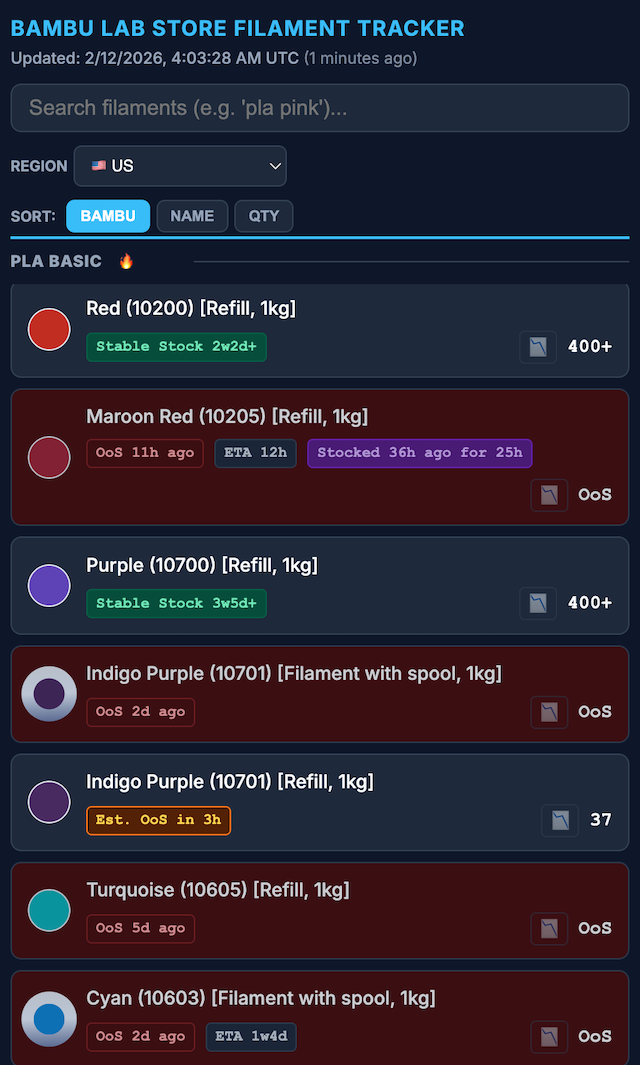
I’ve been running a Bambu Lab Store filament tracker at bbltracker.com.

I built this tracker with the assistance of Google Antigravity and Codex. I supplied the ideas and directed the work; the agents did essentially all of the technical investigation and coding. AI also drafted this post.

bbltracker dashboard

I recently got into 3D printing. A lot of what I print is practical: last-millimeter adapters, things like robot vacuum ramps around the house, and other tiny fixes that make daily life less annoying.

Bambu Lab released the P2S, their flagship midrange printer, and I picked one up after hearing how polished their ecosystem is. People call them the Apple of 3D printers, and I can see why. The hardware is solid, but the software and ecosystem are really what make it shine.

There is also a bit of a format war around filament. Bambu sells filament with RFID tags that are not easy for third parties to mimic. The RFID flow makes loading filament easy and automatically applies Bambu-tuned profiles. Some people feel those profiles run too fast, but for my functional prints, they have worked great.

Where the frustration started

I like having color options, and color can be functional too. But stock has been rough for a while, even after the holiday season.

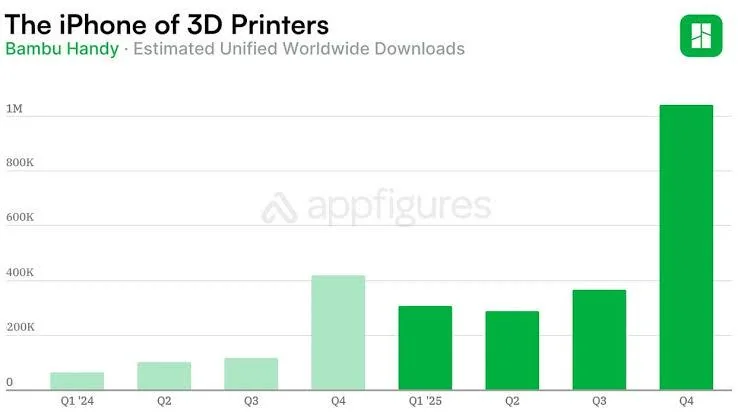
That rough stock situation (and the need for a tracker) is really a symptom of how popular Bambu has gotten, especially over the holidays:

Handy chart showing Bambu popularity spike over the holidays

Source: Reddit comment

Then there is the constant bulk-sale mechanic on the Bambu Lab Store: buy 4+, get a strong discount, buy more, save more. In practice, that falls apart when the combinations you want are never all in stock at the same time.

At the time, the store UI also made this harder than it needed to be. Out-of-stock options were not clearly crossed out, so building a cart felt like guesswork.

That made me angry, but in a constructive way. So I built a tracker.

What the tracker does

At a high level, the tracker monitors store inventory over time, keeps historical snapshots, and renders a dashboard so I can quickly answer:

  • What is actually in stock right now?
  • What appears stable versus constantly draining?
  • What was the last major restock spike?
  • Are there ETA hints for restocks?
  • Is this likely to go out of stock soon?

I started with only the US store, then expanded to EU, CA, UK, AU, and Asia coverage.

I also reused a stock-quantity verification trick I had learned while documenting openpilot’s Toyota security key journey.

Building it fast (and keeping it moving)

I started with Google Antigravity, then moved to Codex later. During the transition, I used a mix of both. Web scraping is tedious work, and having the agents write and revise the code made the constant tweaks easier to keep up with.

The codebase is not pretty in every corner, but LLMs have made it very workable to maintain and improve continuously.

Later, I added depletion-rate estimation so the tracker can make a rough guess about when something might go out of stock.

Things that happened after launch

After I released it and posted it on /r/BambuLab, a bunch of interesting things happened:

  • Bambu nerfed the original stock-count hole the tracker used.
  • For a while, counts were capped at 200 in the US view, which reduced visibility.
  • Later, that cap moved to 400 in the US store. Maybe my tracker’s utility was actually a factor in that decision? I do see traffic from China, where there is no Bambu Lab Store of the same codebase as far as I can see.
  • Bambu improved their UI and added clearer out-of-stock cross-outs.
  • I added more quality-of-life indicators, including “stable stock,” ETA context, and restock-spike visibility.
  • I added a GoFundMe and a nice patron funded a custom domain and hosting for the tracker.

Backend at a glance

Keeping this online reliably has mostly been a deployment and operations problem:

If you print a lot and buy filament in batches, this has been much better than manually refreshing product pages and hoping for the best.

8:10 pm / Bambu , Filament , Duckdb , Typescript , Cloud run , Cloudflare pages , Ai assisted , Google antigravity , Codex