Bambu Lab Store Filament Tracker
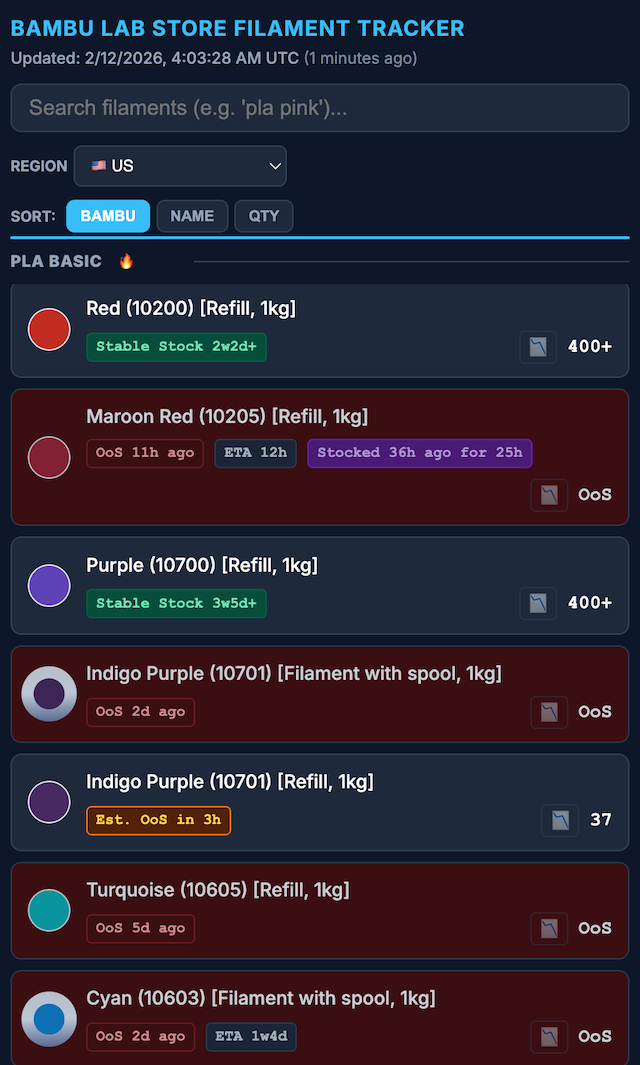
I’ve been running a Bambu Lab Store filament tracker at bbltracker.com.
I recently got into 3D printing. A lot of what I print is practical: last-millimeter adapters, things like robot vacuum ramps around the house, and other tiny fixes that make daily life less annoying.
Bambu Lab released the P2S, their flagship midrange printer, and I picked one up after hearing how polished their ecosystem is. People call them the Apple of 3D printers, and I can see why. The hardware is solid, but the software and ecosystem are really what make it shine.
There is also a bit of a format war around filament. Bambu sells filament with RFID tags that are not easy for third parties to mimic. The RFID flow makes loading filament easy and automatically applies Bambu-tuned profiles. Some people feel those profiles run too fast, but for my functional prints, they have worked great.
Where the frustration started
I like having color options, and color can be functional too. But stock has been rough for a while, even after the holiday season.
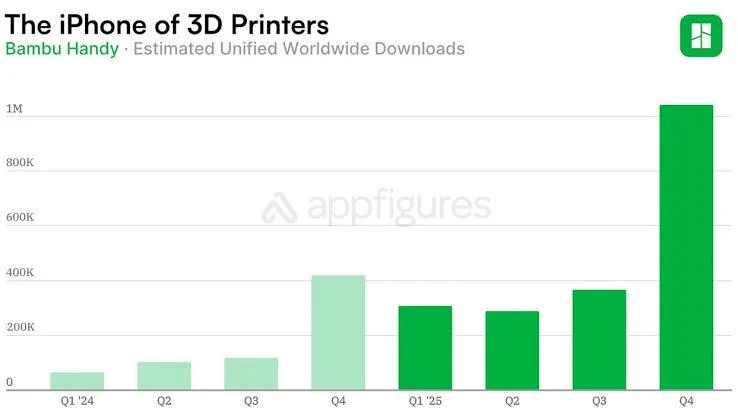
That rough stock situation (and the need for a tracker) is really a symptom of how popular Bambu has gotten, especially over the holidays:
Source: Reddit comment
Then there is the constant bulk-sale mechanic on the Bambu Lab Store: buy 4+, get a strong discount, buy more, save more. In practice, that falls apart when the combinations you want are never all in stock at the same time.
At the time, the store UI also made this harder than it needed to be. Out-of-stock options were not clearly crossed out, so building a cart felt like guesswork.
That made me angry, but in a constructive way. So I built a tracker.
What the tracker does
At a high level, the tracker monitors store inventory over time, keeps historical snapshots, and renders a dashboard so I can quickly answer:
- What is actually in stock right now?
- What appears stable versus constantly draining?
- What was the last major restock spike?
- Are there ETA hints for restocks?
- Is this likely to go out of stock soon?
I started with only the US store, then expanded to EU, CA, UK, AU, and Asia coverage.
I also reused a stock-quantity verification trick I had learned while documenting openpilot’s Toyota security key journey.
Building it fast (and keeping it moving)
I used a lot of Google Antigravity while building this. Web scraping is tedious work, and large language models helped a lot with iteration speed and the constant tweaks.
The codebase is not pretty in every corner, but LLMs have made it very workable to maintain and improve continuously.
Later, I added depletion-rate estimation so the tracker can make a rough guess about when something might go out of stock.
Things that happened after launch
After I released it and posted it on /r/BambuLab, a bunch of interesting things happened:
- Bambu nerfed the original stock-count hole the tracker used.
- For a while, counts were capped at 200 in the US view, which reduced visibility.
- Later, that cap moved to 400 in the US store. Maybe my tracker’s utility was actually a factor in that decision? I do see traffic from China, where there is no Bambu Lab Store of the same codebase as far as I can see.
- Bambu improved their UI and added clearer out-of-stock cross-outs.
- I added more quality-of-life indicators, including “stable stock,” ETA context, and restock-spike visibility.
- I added a GoFundMe and a nice patron funded a custom domain and hosting for the tracker.
Backend at a glance
Keeping this online reliably has mostly been a deployment and operations problem:
- Google Cloud Run is heavily used for scheduled jobs, scaling, and reliability.
- Cloudflare Pages hosts the output and leaves room for future expansion.
If you print a lot and buy filament in batches, this has been much better than manually refreshing product pages and hoping for the best.